Migrating from rport or openrport
ProxiPort is config-format-compatible with upstream rport and openrport. The migration is a stop / replace / restart, not a schema rebuild.
Server
- Stop the upstream service.
sudo systemctl stop rportd # or: openrportd - Back up the existing state. The datastore lives in
/var/lib/rport/(or/var/lib/openrport/):sudo tar -czf rport-backup-$(date +%F).tar.gz \ /etc/rport /var/lib/rport - Install ProxiPort server packages. See install.
- Copy the config across.
The option names are the same. Only the file path and the systemd unit name change — but two values need a look.
sudo cp /etc/rport/rportd.conf /etc/proxiport/proxiportd.conf[api] doc_rootmust point at ProxiPort's web UI (/usr/share/proxiport/docrootfor a package install; an upstream value such as/var/lib/rport/docrootleaves the UI dark), and anycert_file,key_fileorauth_filepath that still names/etc/rportor/var/lib/rportmust follow the files. - Point ProxiPort at the existing datastore. Edit
/etc/proxiport/proxiportd.confso the[server] data_dirmatches your old/var/lib/rportlocation, or move the directory:Either way the directory must belong to the accountsudo mv /var/lib/rport /var/lib/proxiportproxiportdruns as —sudo chown -R proxiport:proxiport /var/lib/proxiport— since upstream ran asrport. - Start the service.
Pending schema migrations run automatically on first start.
sudo systemctl enable --now proxiportd
sudo journalctl -u proxiportd -n 50
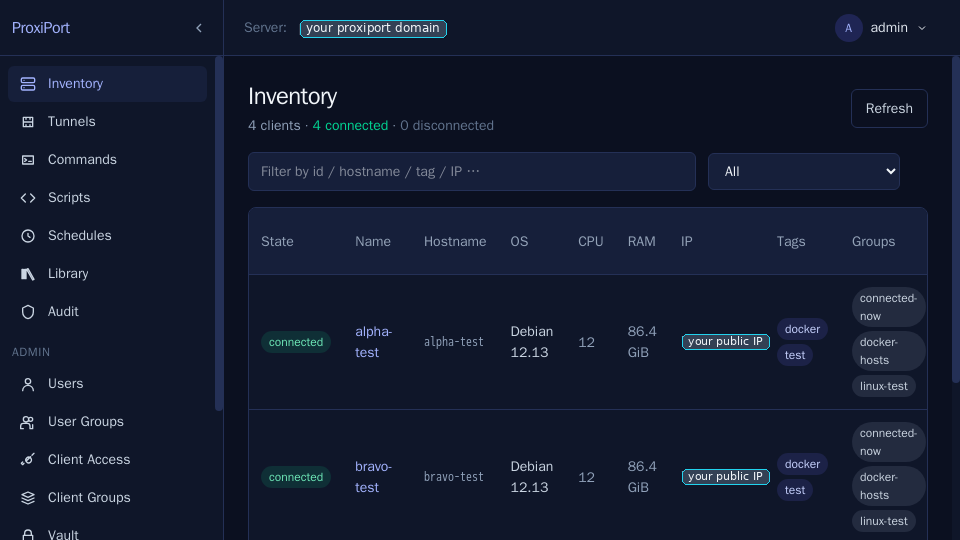
Existing agents reconnect against the same client-auth credentials and the same host-key fingerprint, so the inventory comes back populated without any per-agent touch:
 7. Disable the old unit so it does not race ProxiPort on reboot.
sudo systemctl disable rportd
Agents
Each agent needs the binary swapped and the config relocated. The control protocol is unchanged — agents register against the same client-auth credentials.
- Stop the upstream agent.
sudo systemctl stop rport # or: openrport - Install the ProxiPort agent package (see install).
- Move the config.
The ProxiPort agent runs as its own account,
sudo cp /etc/rport/rport.conf /etc/proxiport/proxiport.conf sudo chown root:proxiport-agent /etc/proxiport/proxiport.conf sudo chmod 0640 /etc/proxiport/proxiport.confproxiport-agent, so point[client] data_dirat a directory that account owns (/var/lib/proxiport-agentin the packages) rather than at the old/var/lib/rport. - Re-issue the host-key fingerprint if the server's host key
changed. If you reused the same
key_seedinproxiportd.conf, the fingerprint is unchanged — keepfingerprint = "..."as it was. If the server now has a different key, copy the new fingerprint from/var/log/proxiport/proxiportd.logon first start. - Start.
sudo systemctl enable --now proxiport
What is config-compatible
[server]block options:address,key_seed,auth_file,data_dir,keep_lost_clients,tunnel_*,used_ports,excluded_ports.[api]block options:address,auth,auth_file,auth_user_table,auth_group_table,auth_group_details_table,jwt_secret,doc_root,cert_file,key_file,access_log_file,user_login_wait,max_failed_login,ban_time,totp_enabled,totp_login_session_ttl,totp_account_name. (auth_group_details_tableis required for per-group permission editing in the database store; see API authentication.)[logging],[database],[caddy-integration],[monitoring],[notifications],[pushover],[smtp]blocks — same option names as upstream. (There is no separate[client-auth]block — client-authentication options live under[server]:auth,auth_file,auth_table,auth_multiuse_creds,equate_clientauthid_clientid.)- The schedule, command, script, library, audit-log, vault, and user-auth tables — same schema, no migration needed.
What is intentionally not migrated
- Anything
plus/produced. OAuth/OIDC sessions issued via the upstream Plus plugin will not work after migration. Affected users will need to log in via local password + (optional) TOTP, which is the AGPL-supported path. - Alerting state. The upstream alerting feature was Plus-gated. Alert definitions in the database are ignored. They will start working again when alerting is reimplemented in the open.
- The Vue/Nuxt frontend. Users do not need to migrate anything — the SvelteKit SPA is served by the new server out of the box.
Rollback
If the migration fails and you need to roll back:
sudo systemctl stop proxiportd
sudo systemctl enable --now rportd
The datastore is forwards-compatible from openrport, so rolling back in the other direction (after ProxiPort ran migrations on the schema) may not work cleanly. Restore from the backup taken in step 2 above.